

Most Australian SMBs finish their HubSpot implementation and assume adoption will follow. It rarely does. The system is live, the data is migrated, the team has been shown the basics. Three months later, half the staff is back in spreadsheets and the pipeline view no longer reflects reality.
The gap between a working CRM and a CRM your team actually uses is where most of the investment gets lost. This guide covers why CRM user adoption drops after HubSpot implementation and what Australian mid-market leaders can do to fix it, from training and change management to data quality and workflow design.
UpLaunch works with Australian businesses at exactly this point: the system is built, but the operating rhythm has not changed. What follows is the sequence that closes that gap.
Key Takeaways: CRM User Adoption in HubSpot
- CRM adoption fails in the months after go-live, not during the implementation itself.
- Login rates do not measure adoption; track data capture, process compliance, and decision-making instead.
- Most underutilisation is a process defect, not a training defect, so fix workflows first.
- UpLaunch helps Australian SMBs close the post-implementation adoption gap with structured enablement.
- Data quality gates must pass before automation or reporting can deliver reliable outcomes.
What CRM User Adoption Actually Means After Implementation
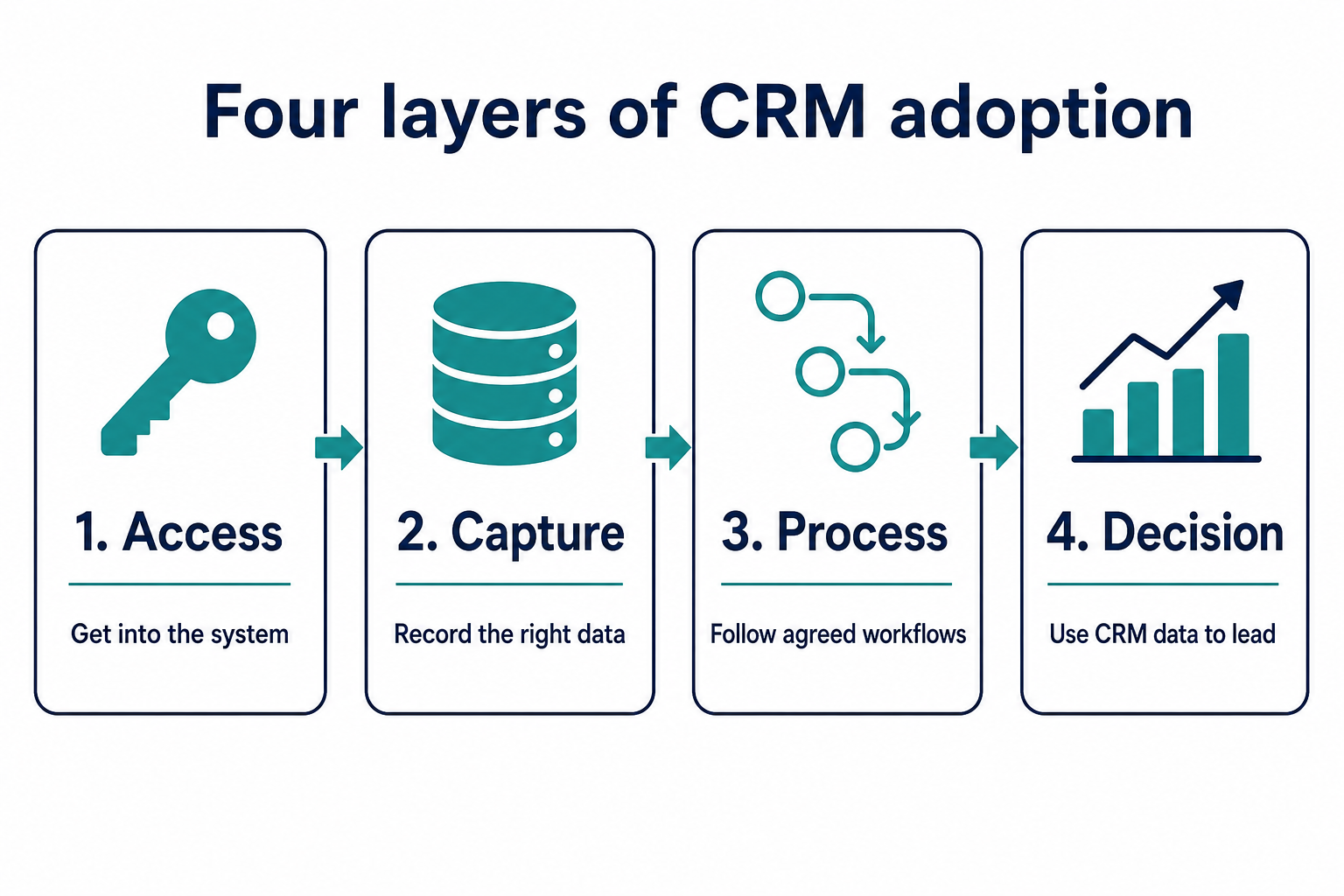
CRM user adoption is the measure of how consistently and effectively your team uses the CRM to complete their actual work. It is not the same as login frequency. A team can log in daily and still bypass every process the system was built to enforce.
Adoption has four layers. Access means your team can get into the system. Capture means they are entering data in the right fields at the right time. Process means they are following the workflows and stages you have configured. Decision means leadership is using the CRM data to make pipeline calls, forecast revenue, and allocate resources.
Most businesses measure layer one and assume the rest is happening. It usually is not. If your reps can describe exactly what the system expects and still choose to do something else, you have a process problem, not a knowledge problem.
Why CRM Adoption Drops After HubSpot Go-Live
The dangerous window for adoption is months three to six. Launch energy fades. The first quarter-end arrives. Reps discover which parts of the new process cost them time they do not have. At that point, old habits offer less friction than new ones.
Research consistently shows that 55 to 70 per cent of CRM projects fail to meet their stated objectives. Over 60 per cent of those failures trace back to people-related challenges, not to the platform. Only 6 to 10 per cent of CRM failures are caused by the software itself.
In Australian SMBs, the pattern has a specific shape. Teams are smaller, so each person carries more roles. There is rarely a dedicated CRM administrator. The person who championed the project often moves on to the next priority, and nobody owns adoption after the first month.
The Five Root Causes of Low HubSpot Adoption in Australian SMBs
Workflows That Do Not Match How the Team Actually Sells
If your deal stages in HubSpot do not reflect the real steps your sales team follows, they will work around them. A pipeline that looks clean in theory but forces reps to log steps that do not exist in practice creates friction at every update.
The fix starts with mapping your actual sales process before configuring pipelines. Talk to the people who close deals. Document what they do, in what order, and where handoffs happen. Then build the CRM around that process.
Training That Teaches Features Instead of Workflows
Generic CRM training shows users where buttons are. It does not show them how to run their day inside the system. A sales rep needs to know: when I get a new lead, what do I do first? When a deal moves to proposal, what fields must I fill? What happens if I skip a step?
Role-specific training, anchored to daily tasks and tied to actual outcomes, is what drives consistent use. UpLaunch delivers hands-on training built around how your team works, not around a generic feature tour.
No Ownership of Adoption After Go-Live
Implementation projects have a clear end date. Adoption does not. When nobody owns the ongoing rhythm of checking data quality, reviewing pipeline hygiene, and coaching users on process gaps, the system drifts.
Assign a CRM owner. This does not have to be a full-time role in a smaller team. It does have to be someone with the authority to enforce process standards and the time to review usage weekly.
Dirty Data That Undermines Trust in the System
If your contact records are duplicated, your deal values are outdated, or your lifecycle stages are inconsistent, the reports your team pulls will not match reality. When that happens, leadership stops trusting the CRM. When leadership stops trusting it, the team stops feeding it.
Clean records make a CRM look brilliant. Messy ones make it automate the mess faster. Data quality is a gate, not a feature. It must pass before anything built on top of it can work.
Automation That Feels Opaque to Users
Automation should reduce effort, not create confusion. When a field populates with a value a rep cannot trace back to a trigger, trust breaks down. They stop relying on automated data and start keeping their own records on the side.
Transparent automation does fewer things, but the user can always answer why a field changed. Build transparent first. Layer complexity once trust is established.
How to Build a CRM Adoption Plan for Your HubSpot Portal
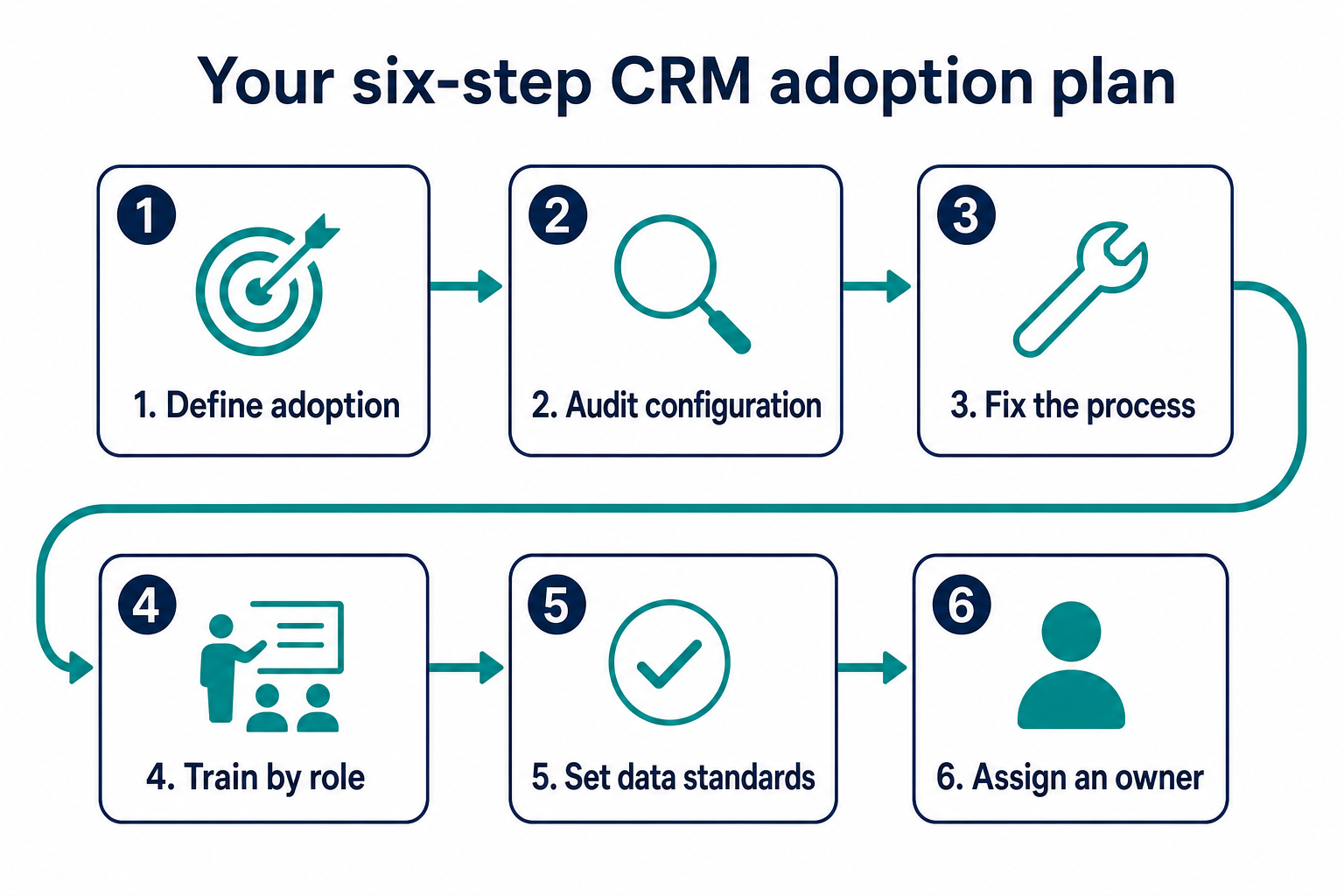
Step 1: Define What Adoption Looks Like for Your Business
Before you can improve adoption, you need to define what good looks like. This is not a generic checklist. It is specific to your team size, your sales cycle, and your reporting needs.
Start with three questions. What data must be captured at each deal stage? Which reports does leadership need to make weekly decisions? What process steps, if skipped, would break downstream workflows?
The answers give you a measurable adoption baseline.
Step 2: Audit Your Current HubSpot Configuration
Run a health check on your portal. Look at pipeline stages, required fields, workflow triggers, and automation rules. Identify where the configuration does not match how the team actually works.
UpLaunch offers health checks and audits that benchmark your portal against operational best practices and flag the gaps that are costing you adoption.
Step 3: Fix the Process Before You Retrain
If the process is wrong, retraining on the same broken workflow does not help. Fix the pipeline stages. Remove unnecessary required fields. Simplify the steps reps must follow to move a deal forward.
The goal is to reduce the effort required to comply with the process. You can estimate the cost of reconfiguring your portal using a fixed-price model.
Step 4: Deliver Role-Specific Training
Train each role on their specific daily workflow inside HubSpot, not on the platform as a whole. A sales rep needs a different session from a marketing manager, who needs a different session from a service agent.
Record each session. Make the recordings accessible inside your internal knowledge base. New hires should be able to watch the training for their role on day one without waiting for a scheduled session.
Step 5: Establish a Data Quality Gate
Set minimum data standards and enforce them before any automation or reporting layer goes live. This means required fields on deals, contact deduplication rules, and lifecycle stage definitions that your whole team agrees on.
A data quality gate is not optional. Everything downstream depends on it: reports, forecasts, automated emails, lead scoring, and customer segmentation.
Step 6: Assign a CRM Owner and Review Cadence
Name one person responsible for CRM adoption. Give them a weekly review rhythm: check data completeness, review pipeline hygiene, flag process gaps, and report adoption metrics to leadership.
This role does not require a technical background. It requires the authority to hold people accountable and the discipline to review the numbers consistently.
Measuring CRM Adoption Beyond Login Rates
Data Capture Rate
Measure the percentage of required fields that are filled at each deal stage. If your team is moving deals forward without completing the data you need for forecasting, your adoption metric should reflect that.
In HubSpot, you can build custom reports that track field completion rates by user, by pipeline, and by deal stage. These reports tell you exactly where data entry is breaking down.
Process Compliance
Track whether deals are following the correct stage progression. Deals that skip stages, jump backwards, or sit in one stage for too long are signals that the process is not being followed.
HubSpot's deal stage duration reports and pipeline velocity metrics give you visibility into where the process breaks. Use them weekly, not quarterly.
Decision Layer Usage
The ultimate test of adoption is whether leadership uses CRM data to make decisions. If your weekly sales meeting still relies on a separate spreadsheet or verbal updates instead of the HubSpot dashboard, adoption has not reached the layer that matters most.
Build the dashboards leadership needs. Put them in front of decision-makers at every meeting. When leadership pulls data from the CRM by default, the team notices and follows.
Change Management for CRM Adoption in Australian SMBs
Why Change Management Matters More Than You Think
CRM implementation is a change programme with a software deliverable attached. Treat it the other way around, and you end up with a system that works technically but never becomes the way your team operates.
Research from Prosci across thousands of change practitioners found that projects with structured change management meet or exceed their objectives at nearly twice the rate of those without it. The methodology is not complex. It requires awareness, desire, knowledge, ability, and reinforcement.
How to Apply Change Management in a Smaller Team
You do not need a dedicated change management team. You need four things: a clear reason for the change that every team member can repeat, visible executive sponsorship from the person who signs off on targets, role-specific training that connects the CRM to daily outcomes, and a reinforcement mechanism that catches backsliding early.
In a team of 20 to 50 people, the managing director or head of sales is often the most effective adoption sponsor. Their visible use of the CRM dashboard in meetings sends a stronger signal than any training session.
How Data Quality Gates Improve HubSpot Adoption
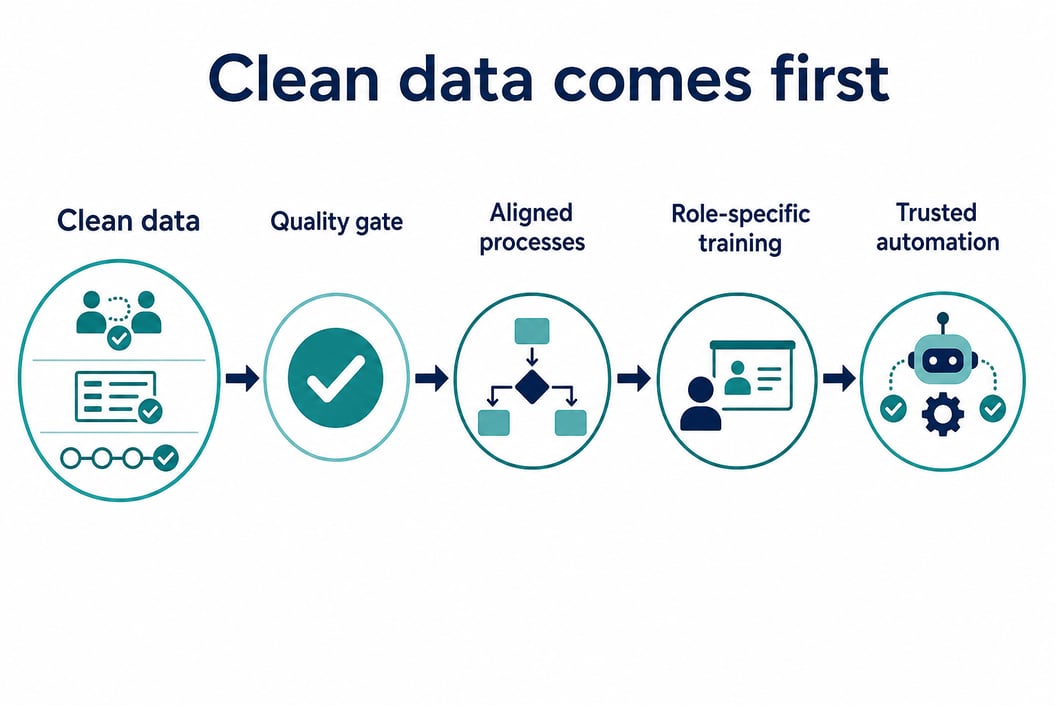
Data quality is the prerequisite that most adoption plans skip. Without clean, consistent data, every layer of the CRM built on top of it produces unreliable outputs. Reports become guesswork. Automated workflows trigger on bad inputs. Lead scoring assigns the wrong priorities.
The data quality gate is a checkpoint that must pass before you switch on automation, build reporting dashboards, or roll out new features. It includes deduplicating contacts, standardising lifecycle stages, enforcing required fields on forms and deal stages, and validating imported records.
UpLaunch structures every implementation with a data quality gate. The principle is straightforward: if your data is not clean, your automation will automate the mess. Fix the data first. Everything else follows in order.
Making HubSpot Workflows Fit Your Team, Not the Other Way Around
The most common adoption failure is a workflow that was designed for a demo, not for daily operations. When the implementation partner builds pipelines and automations based on how a process should work in theory, the team inherits a system that does not match their reality.
UpLaunch sets up HubSpot to match how your business actually works. That starts with discovery: mapping your current process, identifying bottlenecks, and confirming the order of operations before any configuration happens.
The result is a CRM that reduces effort instead of adding it. When the system fits the work, people use it. When it fights the work, they find workarounds.
The Role of Ongoing Support in Sustaining Adoption
Adoption is not a project with an end date. It is an operating discipline. Teams change. New hires join. Processes evolve. The CRM configuration that worked at launch may not work six months later.
Ongoing managed support gives you a structured way to keep your portal aligned with how your team works. This includes regular health checks, workflow adjustments, new user onboarding, and proactive recommendations based on how your usage patterns change over time.
Smaller tasks, like adding a property, adjusting a workflow trigger, or building a new report, are covered by prepaid support packs. The goal is to remove the friction between identifying a gap and fixing it.
How UpLaunch Helps Australian SMBs Close the Adoption Gap
UpLaunch is a HubSpot Diamond Partner based in Sydney, working with Australian and New Zealand businesses that need their CRM to deliver operational certainty, not just a login screen.
The approach starts before anything is built. Strategy and planning comes first: mapping your goals, processes, and reporting so the implementation matches how your team actually operates. Every launch pack includes recorded training sessions and a 30-day health check.
For businesses that have already implemented HubSpot but are not getting the adoption they expected, UpLaunch delivers audits, reconfigurations, and structured enablement to close the gap. The work is sequenced: data quality first, then process alignment, then training, then automation. That order matters because each step depends on the one before it.
Getting Your Team to Use HubSpot Starts with Process, Not Pressure
CRM user adoption does not improve by asking people to try harder. It improves when the system matches the work, the data is clean, the training is specific, and someone owns the ongoing rhythm of review and reinforcement.
If your HubSpot portal is live but your team is still working around it, the fix is usually closer than you think. Start with a process audit. Identify where the configuration does not match reality. Fix the gaps, retrain on the updated workflow, and assign ownership.
UpLaunch runs a 30-minute discovery call to map out where adoption is breaking down and what needs to happen next. No obligation.
FAQs About CRM User Adoption in HubSpot
What is CRM user adoption and why does it matter?
CRM user adoption measures how consistently your team uses the CRM to complete real tasks, not just log in. Low adoption means your CRM data is incomplete, your reports are unreliable, and your investment is underperforming.
Why does CRM adoption drop after HubSpot implementation?
Adoption typically drops in months three to six after go-live. Launch attention fades, quarter-end pressure builds, and reps discover which new process steps cost them time. Without an adoption owner and reinforcement plan, old habits return.
How can UpLaunch improve CRM adoption for Australian businesses?
UpLaunch sequences the fix: data quality first, then process alignment, then role-specific training, then automation. Every HubSpot implementation includes recorded training and a 30-day health check, so adoption is built into the delivery from the start.
What is a data quality gate in HubSpot?
A data quality gate is a checkpoint that must pass before automation, reporting, or new features are switched on. It covers contact deduplication, required field enforcement, lifecycle stage standardisation, and import validation inside your HubSpot portal.
How do you measure CRM adoption beyond login rates?
Track data capture rates, process compliance, and decision-layer usage. UpLaunch recommends building custom HubSpot reports that measure field completion by user and deal stage, deal progression accuracy, and whether leadership uses CRM dashboards for weekly decisions.
What role does change management play in CRM adoption?
Change management addresses the human side of CRM implementation. Research shows that projects with structured change management meet objectives at nearly twice the rate of those without it. Even a small team benefits from a clear reason for change, visible sponsorship, and a reinforcement plan.
Planning a HubSpot build?
Choose a pack, add what you need and see your fixed price in two minutes.